How Can You Build a Roth IRA Calculator Online?
Want to actually build your own working Roth IRA calculator? Here's a genuinely practical breakdown of the necessary inputs, formulas, and thoughtful design choices that make one truly useful for everyday visitors.
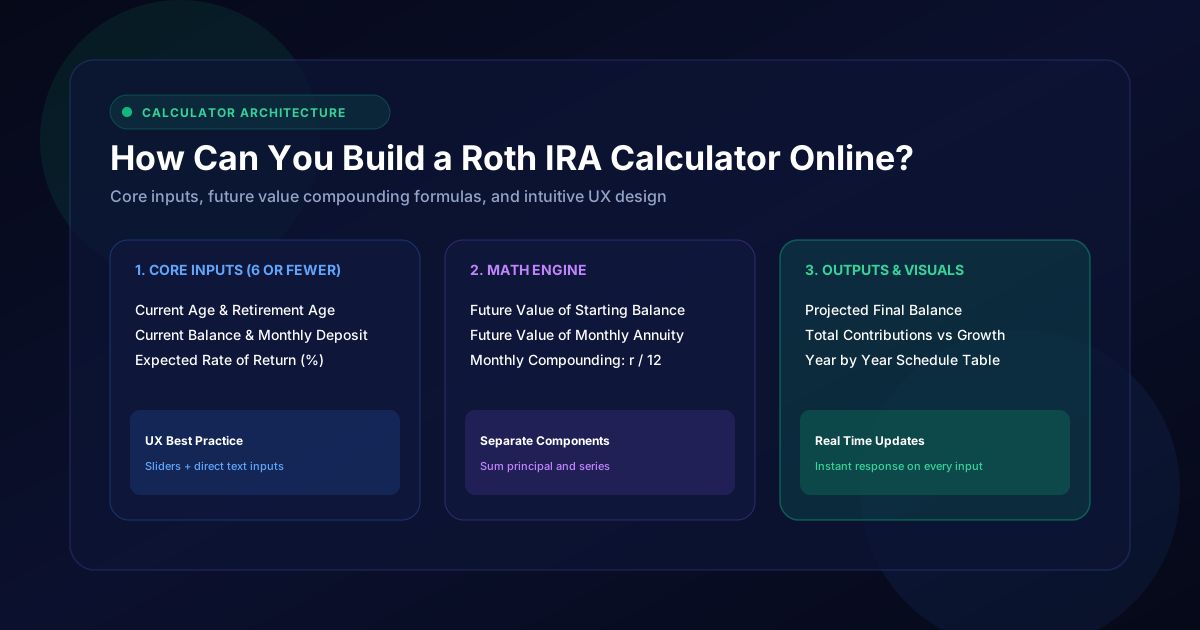
Want to actually build your own working Roth IRA calculator? Here’s a genuinely practical breakdown of the necessary inputs, formulas, and thoughtful design choices that make one truly useful for everyday visitors.
What Inputs Should a Roth IRA Calculator Include?
Essential Roth IRA calculator inputs should include current age, planned retirement age, current balance, contribution amount, contribution frequency, and a clearly stated expected annual return percentage.
Keep the required fields to six or fewer. Every additional input measurably reduces completion rates, so push anything optional into an advanced section users can expand if they want it.
How to Calculate Future Roth IRA Value
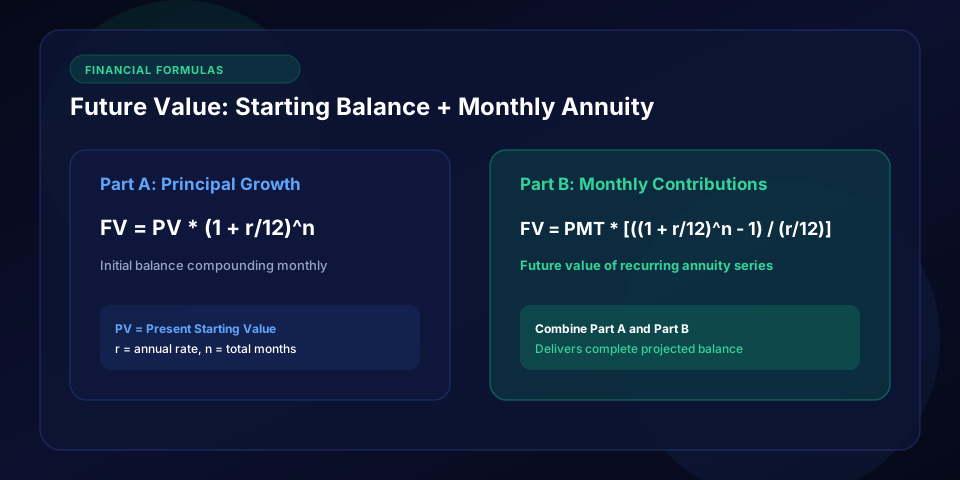
The future value formula combines your current balance steadily growing at the expected rate, plus the calculated future value of your ongoing contributions.
Everything compounds carefully across your entire chosen investment timeline. Treat the two components separately in your code, then add them, because debugging a combined formula is miserable.
How to Calculate Monthly Contributions
For monthly contributions specifically, divide your annual rate by twelve first.
Then compound that smaller rate that many times per year, rather than assuming just once annually, for genuinely more precise and accurate results. Decide whether deposits land at period start or end, since the difference shows up over decades.
How to Add Expected Investment Returns
Let users freely test multiple investment return scenarios, typically around 5%, 7%, and 9%.
That way they see a genuinely realistic range instead of trusting just one overly optimistic single number blindly. Showing three lines on one chart communicates uncertainty better than any disclaimer.
How to Include Annual Contribution Increases
A more advanced Roth IRA calculator lets contributions grow steadily year over year, matching real-world salary raises.
That beats assuming a flat, unchanging deposit amount forever throughout the entire projection period. A 2-3% annual escalator reflects how people actually save.
How to Account for Retirement Age
Retirement age ultimately determines your total investment timeline available for growth.
Building this as an easily adjustable slider genuinely helps users instantly see how delaying retirement changes their final outcomes. Sliders invite experimentation in a way that text boxes never do.
How to Display Contributions vs Investment Growth
Break the final results into two clear visual segments: total amount contributed versus investment growth actually earned over time.
“The gap between what you put in and what you take out is the whole story.”
This helpful distinction lets users truly appreciate compounding’s real, tangible impact.
| Calculator Input | Example Value |
|---|---|
| Current Age | 30 |
| Retirement Age | 65 |
| Current Balance | $10,000 |
| Monthly Contribution | $500 |
| Expected Return | 7% |
How to Add Inflation-Adjusted Results
Offer an optional toggle that shows results in today’s actual dollars, adjusted for roughly 2.5% annual inflation.
This thoughtful feature keeps projections realistic, grounded, and genuinely useful for long-term planning purposes.
How to Make the Calculator Easy to Use
Simple, intuitive sliders genuinely beat complicated multi-step forms every time.
Real-time updates, triggered as users freely adjust inputs, keep engagement noticeably high and reduce frustrating, confusing extra clicks throughout the experience. Prefill sensible defaults so the page shows a result before anyone types anything.
What Results Should a Roth IRA Calculator Show?
Show the final balance clearly, total contributions made, total growth earned, and ideally a year-by-year visual chart.
A genuinely clear retirement projection tool turns raw numbers into an understandable, compelling story.
Case Study: The Default That Doubled Engagement
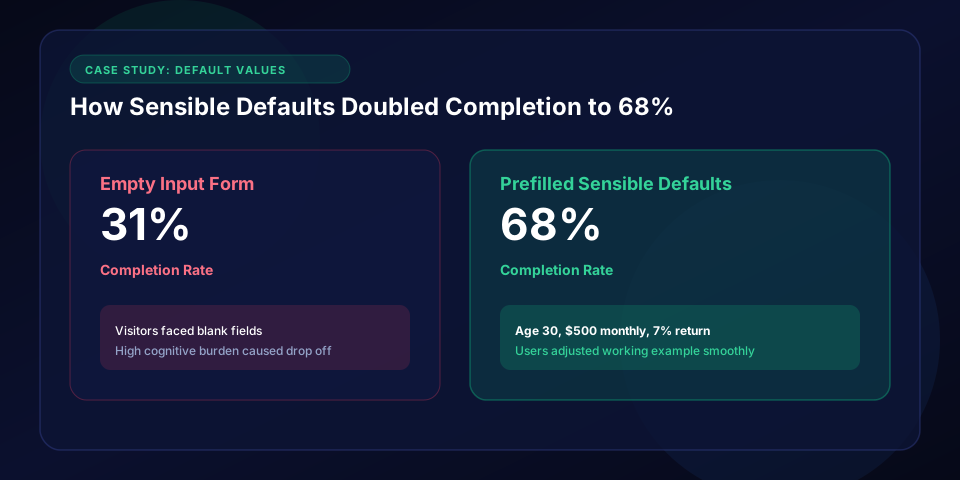
One finance site launched its calculator with empty fields and saw 31% completion. After prefilling age 30, $500 monthly, and 7% return so a $920,000 result appeared instantly, completion jumped to 68%. Users adjusted from a working example rather than facing a blank form.
Conclusion
Building a solid Roth IRA calculator ultimately means carefully balancing accurate formulas with genuine everyday usability.
Get the core inputs right, and users gain a truly powerful tool for making real retirement planning decisions confidently.
Ready to calculate your own tax free retirement savings?
Test different contribution rates, return assumptions, and compare against taxable accounts.